The Making of a Decision - Part 4 - Team and Personal Tools
This series covers the topics described in this talk. This is part 4 of the series about decision making in software systems.
- The Making of a Decision - Part 1
- The Making of a Decision - Part 2 - Knowledge
- The Making of a Decision - Part 3 - Tools for groups
- The Making of a Decision - Part 4 - Team and Personal Tools - This post
- More coming soon
Part 1 of this series explored how power shapes organisational and architectural decision making by reviewing definitions, laws of power and more. Part 2 covered concepts and models relating to Knowledge, what we mean when we say we know something and who has the right to know things.
In this post, we will leverage what we learned and turn to tools that help to use these concepts in practice. The following is not a comprehensive list. These are tools I’m familiar with that helped me solve issues in the past. Each tool’s ‘Why use this tool’ section explains how it tackles specific decision-making problems at a high level. For more nuance or extra details please see the resources I linked to or send me some comments or questions.
I decided to group these tools by the size of the group that it affects, as the decision to adopt them is with different roles. For each tool, I will include an overview, provide links to learn more and explain how the tool relates to the topics discussed.
Within a team
Bytesize Architecture Sessions
Overview
Bytesize Architecture Sessions are a workshop format that helps teams understand the systems they work on. Each session focuses on a small slice of a system. After a few sessions, your team will be understand their software systems more consistently, grow a common vocabulary and ultimately build tools to design the future together.
Bytesize Architecture sessions are used in decision-making to facilitate collaborative software design through a structured workshop format that prioritises shared understanding. This approach involves small groups of eight to ten people engaging in repeated one-hour modelling sessions. It can be used in the Discovery phase of decision making for understanding the current state and in the Design phase to support option generation or to investigate each option as a group.
 Learn more:
- 📹 A Talk: Knowledge Sharing is Systems Building - Andrea Magnorsky
- 🗒️ Reference Site: Bytesize Architecture Sessions
- 🏛️ OPL reference Open Practice Library: Bytesize Architecture Sessions
- 📔Case Study : Using Bytesize Sessions to Improve Documentation Practices by Jean de Barochez at Payfit
Why use this tool, in the context of better decision making
- Easy to learn and introduce: Not a big time investment for knowledge sharing.
- Improve Understanding: The sessions help groups improve their understanding of complex systems. Each participant “tells the story” of what they modelled, allowing the rest of the group to see exactly how their colleagues perceive the system
- Improving Knowledge Flow: Since documentation alone is often insufficient to carry important design ideas, these sessions bridge the gap through continuous, close connection between team members. By coming together after individual work, the team benefits from the highest level of insight and combined experience of the group
- Resetting Power Dynamics: “Alone Together” is a key aspect here. By having participants model solutions individually before sharing, the process ensures that no single person’s voice influences or dominates the initial creative phase.
Decision Records
Overview
The idea behind ADRs is to record significant architectural decisions in a format that is both concise and based on an accepted template. Recording decisions helps with making better decisions. As a side effect, there is a quick reference to understand what has been done in the past and why. ADRs provide a modular way to capture the rationale, context, and consequences of architecturally significant choices. Specifically designed to address the shortcomings of traditional, large-scale documentation in agile environments. ADRs should document the specific forces at play. Including technological, political, social, and project specific factors that influenced a decision.
Learn more:
- 🗒️ A post: Master architecture decision records (ADRs): Best practices for effective decision-making
Why use this tool, in the context of better decision making
- Consistent Format. While code and documentation are often insufficient carriers of complex design ideas, ADRs function as a conversation with a future team member. This aspect of the documentation can be modular and version controlled.
- Record the context of decisions. Even if you cannot follow the full Architecture Advice Process approach, you can begin by recording your decisions. See this great story The Reality of Systems Change: Facilitating Architecture with Transparency
Personal
Left Hand Column
The Left-Hand Column is a reflective tool developed by Dr Chris Argyris designed to help individuals understand the hidden assumptions and internal dialogues that occur during communication. It is useful for handling difficult conversations, managing awkward meetings, and processing power-related stress. The tool derives from the work on the ladder of inference where, given some data, you quickly form views about a person’s predispositions and eventually act accordingly (see video below for further explanation).
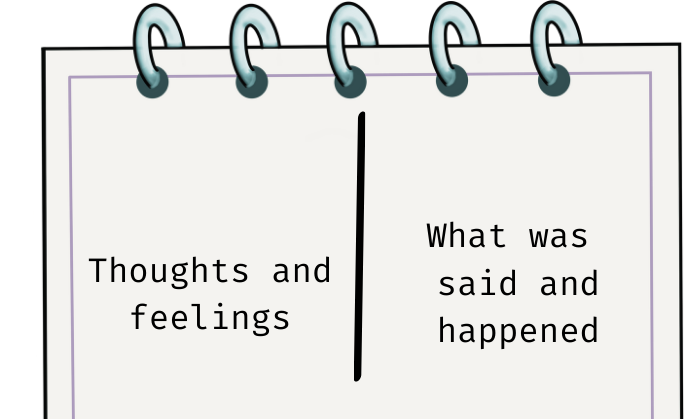
To use this technique, you typically document a conversation by splitting a page into columns:
- The Right-Hand Column: What was said and the facts
- The Left-Hand Column: Your record what you were really thinking and feeling but did not express at the time
The ultimate objective is to become conscious of the dichotomy between words and thoughts. And to challenge your assumptions about why you are interpreting events in a particular way.
In my practice, I use the left-hand column to note what I think, what I think others might be thinking or note that they are not acting as I expected.
Learn more:
- 🗒️ Blog post: Tools for High Stakes Communication: Tool #2, Left Hand Column/Right Hand Column by Alex Johnston
- 📹 Ladder of inference: Ladder of Inference
Why use this tool, in the context of better decision making
- Understand power dynamics, starting with self awareness. This tool allows you to pause and inspect your reactions and those of others.
- Improving Knowledge Flow: Decisions require asking the right questions and understanding the problem from multiple perspectives. By inspecting your internal dialogue, you can identify where communication is breaking down and maybe people are making incorrect assumptions.
Influence Mapping
Overview
Influence Mapping is a visual tool used to navigate the decision environment surrounding a central decision-maker, or “the D”. It addresses the “Sir Galahad Fallacy”, the mistaken belief that technical facts and “better arguments” alone are sufficient to persuade others. Since architectural choices are often a record of hidden power structures, this tool helps externalise complex socio-technical forces.
Key steps:
- Listing and casting: Identifying the authority figure (“D”) and categorising stakeholders.
- Rating metrics: Plotting individuals on a matrix based on their level of support and their organisational influence.
- Visualising relationships: Drawing arrows to show influence paths, where line thickness represents “permission”, the level of receptivity one person has toward another’s influence.
Ultimately, influence mapping helps with understanding that decision-making is about the community around the decision, even if there is one person taking the full responsibility for it. It can help to evolve the broader decision landscape and leverage existing dynamics, ensuring that technical proposals are taken seriously within the organisation’s social context.
Learn more
- 🗒️ Blog post series: Influence Mapping (Part 1) By Charles Lambdin- An in-depth series about what is influence and much more. 100% recommended.
Why use this tool, in the context of better decision making
- Map power flows. A tool that helps with mapping how one subjectively understand power flows.
- Community around decision. Helps you navigate and understand better the group or community around the decision. You will need to speak with people, now you know who to approach, why and have better questions to ask.
Decision KP Map
Decision KP Map is a mapping tool that helps visualise the subjective perception of the community of decision makers, the Key People, in terms of their Knowledge and Power.
It’s a map where you can place your subjective understanding of where people sit in terms of:
- How much accepted knowledge they can access and,
- How much change they are able to effect.
A Decision KP Map always has a specific context, for example an architectural decision. Over the course of a decision, one would generate multiple maps. People can be added or removed as needed.
Learn more:
- 🗒️ Blog post: [The making of a decision Part 5 - Introducing Decision KP Map] - The link will be updated when it’s posted. I have created this mapping tool after doing this talk. After few personal experiments, I asked others if this was a useful format and I had positive feedback. The post covers what it is, how it works, and most importantly how can it help you.
Why use this tool, in the context of better decision making
- Understand what happened during an exchange (e.g. a meeting). An easy to learn tool that helps evaluate your ladder of inference
- Teach people new to leadership how to navigate decisions. Many people who write code (roles and titles vary) enter decision‑making with a significant level of technical knowledge but limited understanding of how the rest of the decision‑making process works. This tool can help them.
Conclusion
The purpose of this series has been to dive deeper into the aspects that go into making a decision that are not generally talked about and yet obstruct decisions. It is easy to think that the best facts are how we make decisions, however this is not what happens in real projects, with real people. So how to understand what happens, and how do we ensure that the best available facts make their way into our decisions? What does “best” mean? All decisions have a unique and rich context. The learnings and tools described in this series are intended to offer new ways of seeing that context and engaging with it meaningfully.
See you in the next post! As usual, please reach out with comments and questions and suggestions for improvements.